Orient
Check freshness, market regime, and directional alignment before looking for an entry.
Trends Info · Market Pulse · Market Confirmation Insights
Multi-market technical intelligence
FREE
Create your account and logged in to your Dashboard. My Coin Trends keeps essential market analysis accessible to everyone.
Sign up free →My Coin Trends brings cryptocurrency and stock market analysis into a structured dashboard. Move from broad market alignment to scanner evidence, MACD momentum, multi-timeframe technical analysis, price action, and accountable outcome review—without treating any single signal as certainty.
A disciplined review flow
The dashboard is designed as a sequence of questions, helping users avoid overreacting to one indicator or one candle.
Check freshness, market regime, and directional alignment before looking for an entry.
Trends Info · Market Pulse · Market Confirmation InsightsCompare price, open interest, breadth, and scanner persistence to understand who is participating.
Price / OI Insights · Scanner SignalsReview profile agreement, acceleration, crossovers, divergence, and the structure of price itself.
MACD Signal Insights · My ChartCompare current opportunity evidence with closed historical outcomes so decisions remain explainable and auditable.
Strategic Opportunity Insights · Scanner Intelligence · My ChartPurpose-built visual analysis
Each visual is scoped by symbol, timeframe, and lookback window so comparisons remain meaningful.
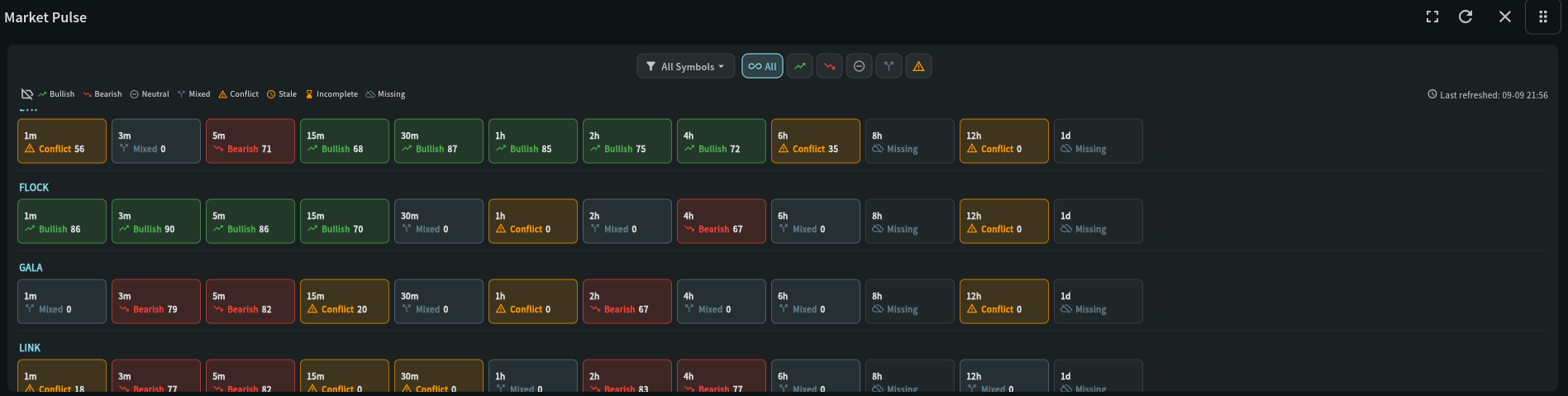
Market Pulse groups Trend/MACD evidence into bullish, bearish, neutral, mixed, conflict, stale, incomplete, and missing states.
Best for broad orientation across symbols and timeframes.Step-by-step use →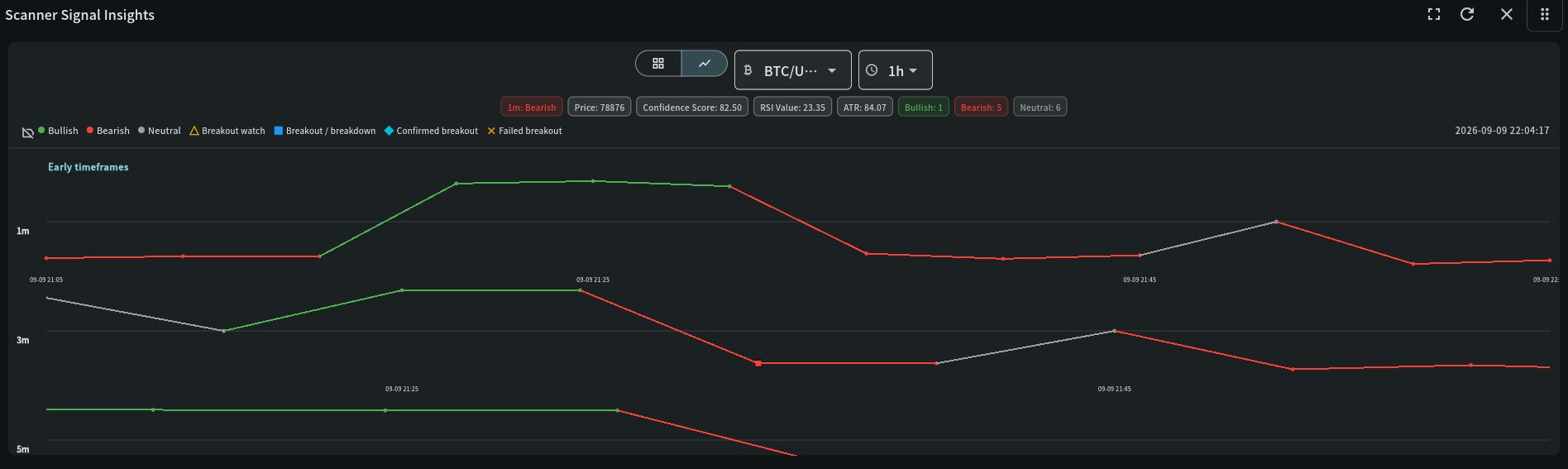
Scanner Signal Insights exposes trend lanes, confidence, price, RSI, ATR, technical tags, and breakout progression through time.
Best for separating persistence from short-lived noise.Step-by-step use →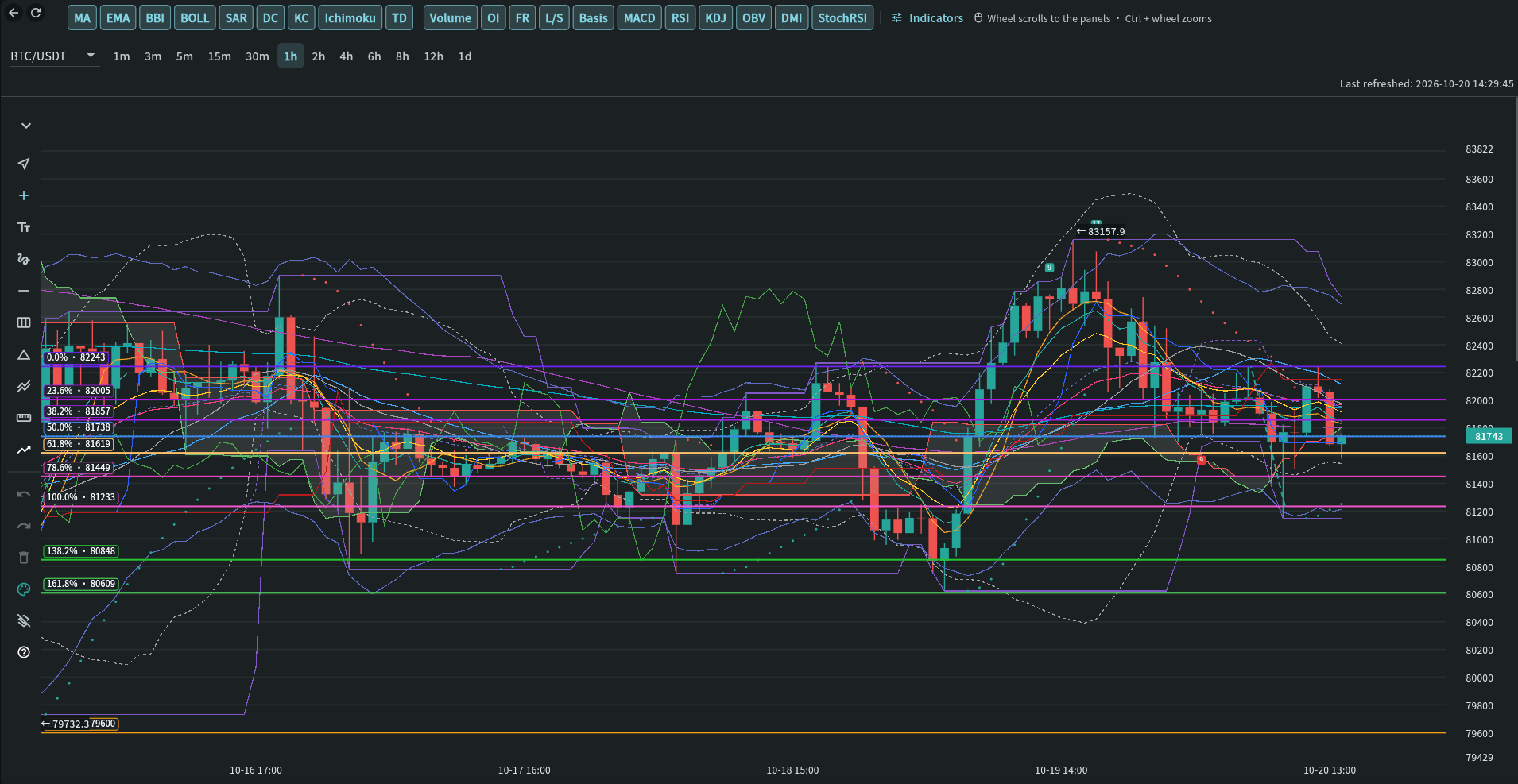
My Chart combines candles with overlays, momentum and derivatives panels (OI, FR, L/S, Basis) and order flow (Taker Flow, trades, liquidations) on one shared timeline.
Best for validating timing and visible market structure.Step-by-step use →Indicator coverage
The technical-analysis workspace combines market momentum, volatility, participation, price action, open interest analysis, and exhaustion indicators. KDJ includes K, D, and J; BBI provides a blended moving-average reference; MACD scanner evidence, breakout states, and early warnings add event context.
Designed for real workflows
Follow early, setup, confirm, and trend MACD profiles while checking acceleration, breakouts, price structure, and cross-timeframe agreement.
Inspect state tables, timestamps, technical reasons, confidence, historical outcomes, and linked records instead of relying on a headline label.
Manage coin access, alerts, profile presets, releases, sessions, devices, announcements, and audit history with role-aware controls.
Features
Each guide describes what the widget shows and how to use it inside My Coin Trends.
Browse the current state tables, including trend, MACD, scanner, strategy, and market-collapse information.
Step-by-step use → 02 StandardCompare price and open-interest states to identify participation changes around market moves.
Step-by-step use → 03 StandardSurface MEGA, Super, and Up Coming opportunities from scanner and higher-timeframe confirmations.
Step-by-step use → 04 StandardCompare bullish, bearish, neutral, and mixed scanner sentiment per symbol as a sortable bar chart or ranked table.
Step-by-step use → 05 StandardRead a concise event timeline of scanner trend changes, indicator tags, price, ATR, and RSI context.
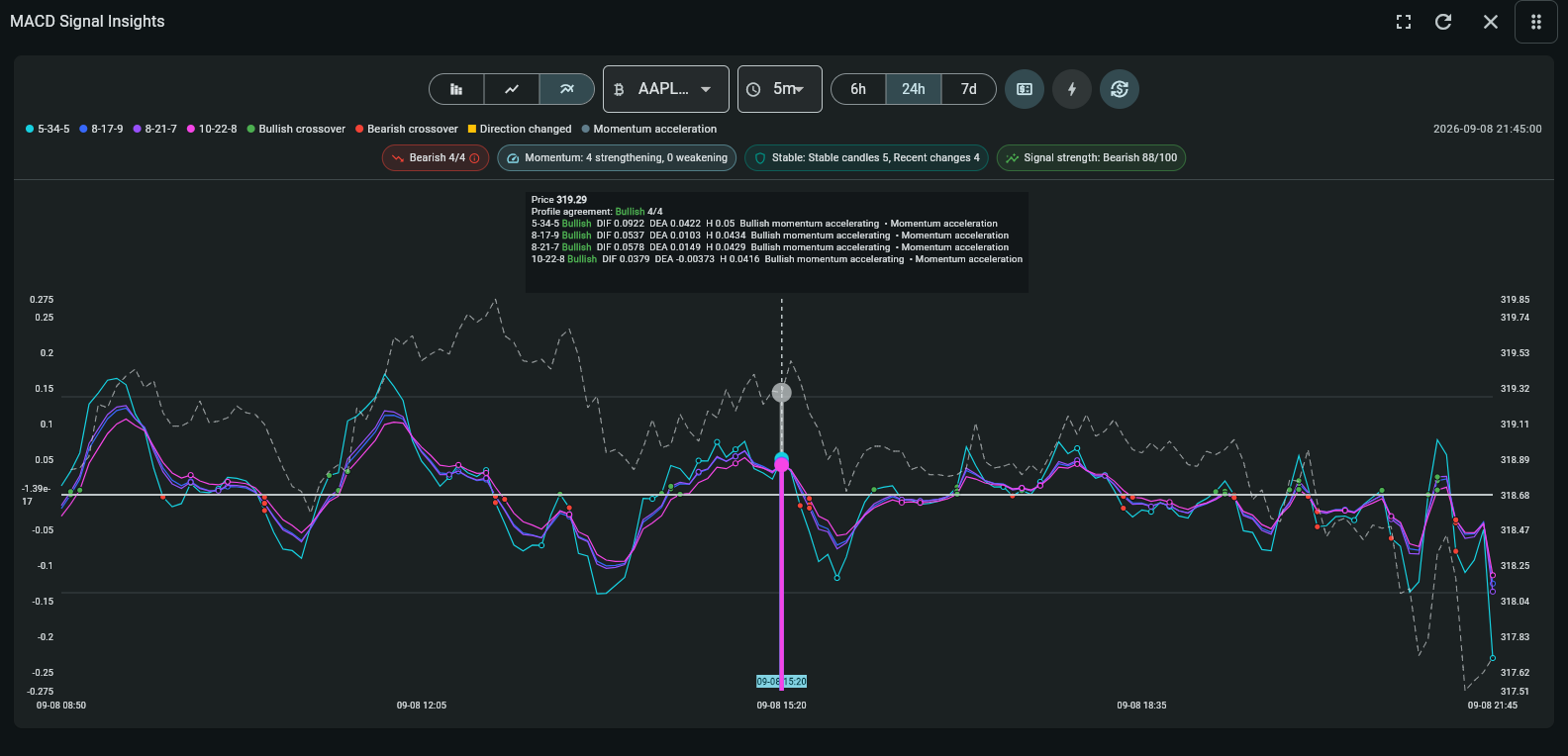
Step-by-step use → 06 StandardTwo tabs in one section: Market Pulse maps Trend/MACD alignment for every symbol and timeframe (Summary and Heat map, with bullish, bearish, neutral, mixed and conflict filters), and MACD Signal Insights connects market breadth, signal events and each configured MACD profile on one timeline.
Step-by-step use → 07 StandardA candlestick chart with overlays (MA, EMA, BBI, BOLL, SAR, DC, KC, Ichimoku, TD) and aligned panels for volume, momentum (MACD, RSI, KDJ, OBV, DMI, StochRSI, AO, BRAR), derivatives (OI, FR, L/S, Basis) and order flow (Taker Flow, Large Trades, Trade Count, Liquidations), plus drawing tools.
Step-by-step use → 08 StandardInvestigate market rotation, opportunity progression, multi-timeframe confluence, replay evidence, and measured trade outcomes in one connected workspace.
Step-by-step use → 09 StandardRank symbols where independent scanner, momentum, trend, participation, structure, and higher-timeframe evidence agree—and expose conflicts before a decision is made.
Step-by-step use → 10 StandardFind accelerating, emerging, reversing or weakening coins early, with visible confidence, confirmation and phase-change context.
Step-by-step use → 11 StandardPut the trend engine, scanner, confirmed MACD, and reversal detection side by side for each coin and surface where they disagree.
Step-by-step use → 12 StandardCompare experimental future-price estimates and direction probabilities for your own symbols across 30m, 1h and 4h. Read every estimate with its target time, uncertainty and evidence status—not as a trade instruction.
Step-by-step use →Operational safeguards
Market intelligence is only useful when users can understand its freshness and administrators can govern how it is delivered.
Standard users receive the complete public market workspace, while administrator-only operational and security records remain protected by the API.
Authenticator support, concurrent-session controls, installation signals, and device history support security review.
Per-event alert controls, temporary sound muting, and channel-specific delivery help reduce unnecessary noise.
Historical replay processes missing closed candles chronologically while suppressing outdated alerts and trade placement until caught up.
Availability
My Coin Trends is free for everyone. Standard access includes every public market-analysis widget, supported timeframes from 15 minutes onward, and up to 5 approved catalog coins.
| Module | Standard |
|---|---|
| Trends Info | ✓ |
| Price / OI Insights | ✓ |
| Strategic Opportunity Insights | ✓ |
| Scanner Signals | ✓ |
| Scanner Signal Insights | ✓ |
| Market Pulse | ✓ |
| My Chart | ✓ |
| Scanner Intelligence | ✓ |
| Market Confirmation Insights | ✓ |
| Trend Tracker | ✓ |
| Source Agreement | ✓ |
| Market Forecast | ✓ |
| Price | FREE |
Web · Android · iOS · Windows · macOS · Linux
Open My Coin Trends in a browser or use a published build for Android, iOS, Windows, macOS, or Linux.
My Coin Trends provides market information and technical signals. It is not investment advice. Verify every signal against current market structure, liquidity, and your own risk limits before making a trading decision.
Read the Terms of Service & Risk Disclosure