Features Standard

Trend Tracker

Find accelerating, emerging, reversing or weakening coins early, with visible confidence, confirmation and phase-change context.

Availability

Standard

Use this widget with its linked state records, your selected timezone, and independent risk management. A signal or chart does not guarantee a trade outcome.

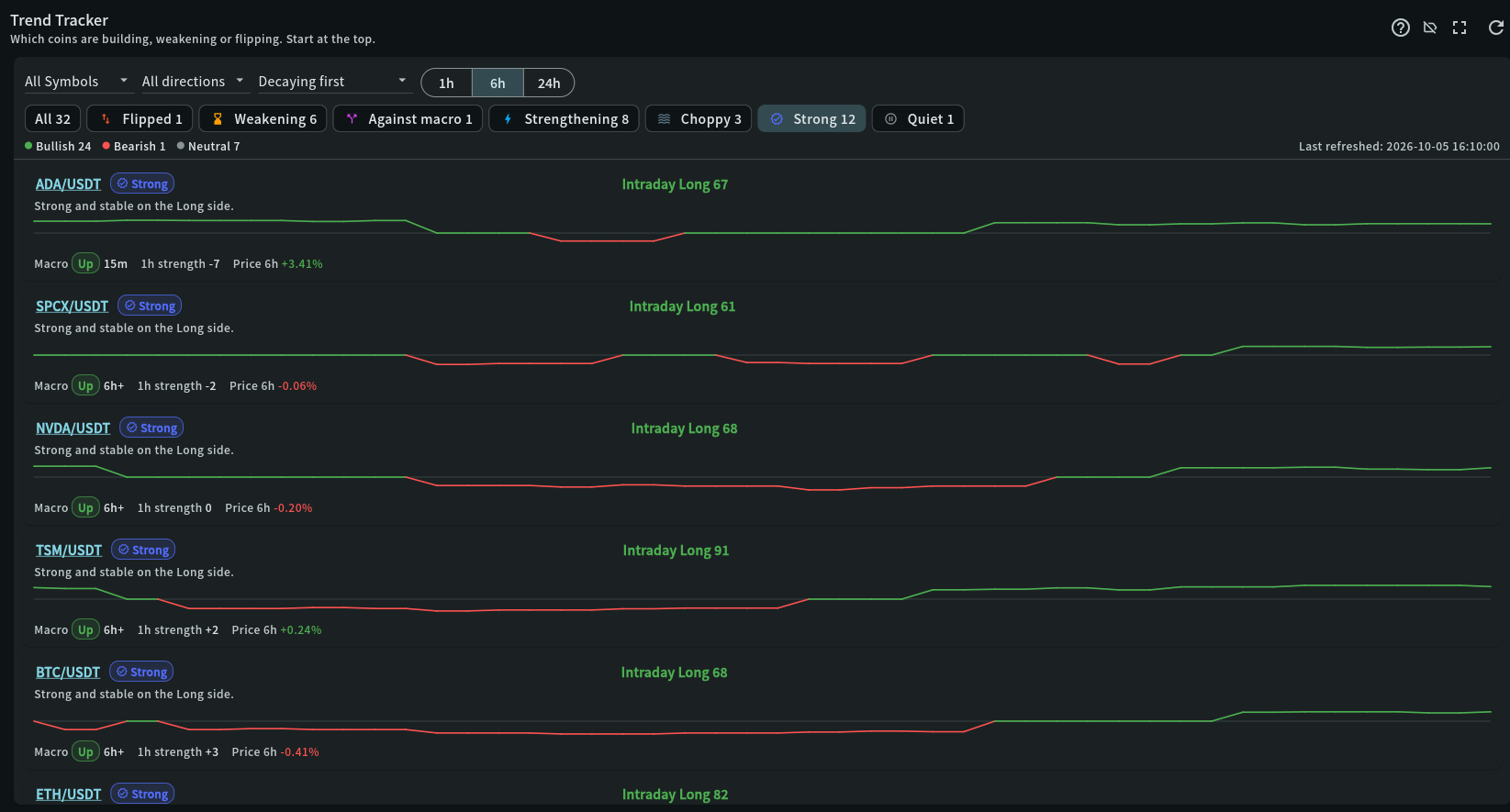
Trend Tracker widget in the My Coin Trends dashboard

Step-by-step use

Trend Tracker

Find accelerating, emerging, reversing or weakening coins early, with visible confidence, confirmation and phase-change context.

  1. 1
    1. Choose the view

    Open Coins and start with the default Time-to-market sort, which prioritises accelerating and emerging trends.

  2. 2
    2. Review the context

    Choose Newest change and a 5m, 15m or 1h Recent changes filter to focus on genuine recent transitions; All clears it.

  3. 3
    3. Continue your review

    Use lifecycle and watch-status chips to narrow the phase and recent behaviour.

  4. 4
    3. Continue your review

    Tap a coin’s lifecycle badge/history icon to review genuine changes over 24 hours, 7 days or the retained 30 days.

  5. 5
    3. Continue your review

    Open Forward validation to compare mature 1h, 4h and 24h direction-adjusted outcomes over 7 or 30 days.

  6. 6
    3. Continue your review

    Use the bell to enable or pause selected lifecycle alerts, set the per-coin cooldown and review Delivered or Suppressed alert history.

  7. 7
    3. Continue your review

    Read velocity, confidence, confirmations, strongest timeframe and Changed, then open the symbol to continue in Trend lanes.

Recommended attention order

What to review first

Trend Tracker tells you which coins are changing early enough to investigate now. Coins combines lifecycle, velocity and fresh independent confirmation with the existing one-hour watch status.

Summary: Top Bullish / Top Bearish → Coins: Time-to-market → Lifecycle and 30-day history → Forward validation → Optional lifecycle alert → Confidence → Watch status and line → Confirm elsewhere

  1. Start with Summary

    Top Bullish lists coins on the Long intraday side and Top Bearish those on the Short side while that side is holding (Strengthening, Strong, Steady or Against macro), up to ten each (an Administrator can change this). Coins with the macro trend come first, then the strongest intraday score. Tap a row to open the coin in Coins.

  2. Start with time-to-market

    The default order prioritises Accelerating and Emerging trends, then fresh reversals, before mature or dormant trends. Use Newest change to order genuine transitions by recency, or the 5m, 15m and 1h Recent changes filter to hide unchanged coins.

  3. Read lifecycle and evidence

    Velocity is score-point change per hour. Confidence and confirmation count use fresh independent Market Confirmation, Market Pulse, Breakout, Source Agreement and Price/OI evidence. The Changed field shows the previous lifecycle and minutes in the current phase.

  4. Open lifecycle history

    Tap a coin’s lifecycle badge with the history icon to review genuine transitions over 24 hours, 7 days or 30 days. Collection starts after deployment and does not reconstruct older phases.

  5. Check forward validation

    Open the chart-statistics action to compare 1h, 4h or 24h direction-adjusted outcomes over 7 or 30 days. Fewer than 20 samples remains Collecting; observed returns are evidence, not a forecast or trade P&L.

  6. Filter, then read the hint and line

    Lifecycle and watch-status chips narrow the same Coins list. Tap a selected chip again to clear it. The sentence explains the one-hour watch status; above the line centre is intraday Long, below is Short.

  7. Check the macro trend

    An intraday move that agrees with the macro trend is more reliable; one against it is often a pullback. A Choppy coin has no reliable direction and is usually best left alone.

  8. Manage and audit lifecycle alerts

    The bell enables or pauses app alerts, selects destination phases and sets the per-coin cooldown. Open Alert history there to review 7 or 30 days of Delivered and cooldown-Suppressed events. Saving starts from that moment and never replays old transitions.

  9. Confirm before acting

    Trend Tracker shows where to look, not what to trade. Open the symbol in Trend lanes and confirm with structure, participation and the other panels.

How to read this widget

Trend Tracker

Use these points to interpret the visible values before moving to a related record or decision.

Lifecycle answers what is changing now

Accelerating and Emerging are early-development states, and a coin that reaches Accelerating keeps it until its velocity falls below +10 an hour (+25 live), for at least 10 minutes unless the move weakens; Confirmed requires a score of at least 60, three fresh independent confirmations, no opposition and confidence of at least 60. Reversing, Exhausting and Failed flag deterioration or a change of side; Reversing also comes from the live reading once it has held the other side for 3 minutes, before the 30-minute reading turns. Dormant has no actionable momentum.

Changed survives refreshes

The existing one-minute status worker retains one bounded current-state row per monitored coin. When the lifecycle changes, Trend Tracker shows the previous phase and minutes in the new phase across app refreshes and backend restarts. It does not store raw Binance data or create an unbounded event history.

History is bounded and genuine

Tap the lifecycle badge to open 24-hour, 7-day or 30-day transition history. Only actual post-deployment lifecycle changes are recorded; initial state and calculation rebases are excluded, and events expire after 30 days.

Forward validation is observed evidence

The chart-statistics action measures each directional transition from the next futures 5-minute open to its 1h, 4h or 24h close, using the existing candle store. Compare favorable rate, average, median and sample count overall and by lifecycle. Fewer than 20 samples remains Collecting; this is not a forecast, backtest or trade P&L.

Lifecycle alerts are opt-in

The bell lets a user select destination phases and a per-coin cooldown. Saving starts monitoring future genuine transitions; it never replays an old transition. Alerts use the existing app announcement and notification flow, not Telegram, email or a trading action.

Alert history explains silence

Open Alert history from the bell dialog to review 7 or 30 days. Delivered means the event entered app announcements; Suppressed means it was recorded once but held by the per-coin cooldown. Pausing the rule stops future claims without rewriting prior audit evidence.

Status is judged on the last hour

Whatever window you choose, each coin’s status describes the last hour: Flipped (switched between Long and Short), Weakening (its side lost at least 15 points of strength, or the direction disappeared), Against macro (the intraday side opposes the macro trend), Strengthening (gained at least 15 points), Choppy (four or more side changes in the window, unless the current side has held for 30 minutes), Strong (score 60 or more and stable), Steady, and Quiet (no clear direction).

The line is direction-signed conviction

The plotted value is the intraday score signed by its direction: positive while the intraday direction is Long, negative while Short, and zero when neutral. A coin with no conviction sits on the centre line rather than reading as bullish.

Velocity, not sign

Velocity is the score-point change per hour on the current side. A Short that gets stronger shows a positive value even though its line moves further below the centre. Decaying first and Improving first use the same measure.

Macro duration

The macro badge shows the slower trend and how long it has held. 6h+ means it spans the whole window: the real start is older than the data loaded, so no smaller figure is shown.

Field reference

What each value means

Use these definitions to interpret the widget consistently across cryptocurrency and stock markets.

FieldMeaningPractical use
LifecycleThe current phase: Accelerating, Emerging, Confirmed, Reversing, Exhausting, Failed or Dormant.Use Time-to-market to surface early changes. Confirmed requires strong score, fresh independent agreement on the confirming timeframe and no opposing 1h/4h; deterioration states need caution.
ChangedThe previous lifecycle, current lifecycle and minutes since the latest phase transition.This survives refreshes and backend restarts. A recent transition deserves review; it is not by itself a trade signal.
Lifecycle historyA bounded timeline of genuine phase changes for one coin over 24 hours, 7 days or 30 days.Tap the lifecycle badge/history icon. History starts after deployment and expires after 30 days; an empty window does not mean the coin never changed before collection began.
Forward validationObserved direction-adjusted returns 1h, 4h or 24h after genuine transitions, over a 7-day or 30-day window.Read favorable rate, average, median and sample count together. Fewer than 20 samples remains Collecting; the result is evidence, not a forecast or trading result.
Recent changesA local All coins, 5m, 15m or 1h filter over persisted lifecycle transitions.Use it with Newest change to focus on time-sensitive transitions. It does not request more market data; alerts are configured separately with the bell.
Lifecycle alertsAn optional app alert when a monitored coin genuinely enters one of the user-selected lifecycle phases.Choose destination phases and a per-coin cooldown. Saving arms future changes only; confirm every alert with the underlying evidence before acting.
Alert historyA 7-day or 30-day audit of Delivered and cooldown-Suppressed lifecycle alerts.Use it to distinguish no transition from a transition intentionally held by cooldown. Pausing alerts does not erase prior history; records expire after 30 days.
StatusOne plain state per coin, judged on the last hour: Flipped, Weakening, Against macro, Strengthening, Choppy, Strong, Steady or Quiet.Check Flipped and Weakening first; they are the coins whose picture is changing. Choppy means there is no reliable direction, so wait; a side held for 30 minutes is no longer Choppy.
Intraday scoreThe intraday score with its side, Long or Short; 0 means no direction. The line plots it above (Long) or below (Short) the centre.Read the side before the number. A coin on the centre line has no direction rather than a weak one.
VelocityHow many score points the current side gained or lost per hour.Positive means the side is gaining strength, whether it is Long or Short. A negative value on a high score is an early warning.
Live 15mVelocity over the last 15 minutes, from the forming candles and updated every minute; ▲ speeding up, ▼ slowing down.It catches a fast move that the hourly velocity dilutes, and can make a coin Accelerating early. When the live reading holds the other side for 3 minutes, the coin is Reversing before the 30-minute reading turns, and its row says so. It is provisional until candles close; shown only while fresh, and not during an exchange trading halt.
1h/4hWhether the 1h and 4h widgets are With, Against or Mixed on this side. First seen is the fastest timeframe where it showed.Against means a move counter to the bigger picture: it can be early but never Confirmed. Confirming timeframe (15m, else 30m) carries the confirmation count.
Macro and durationThe slower macro trend and how long it has held; 6h+ means longer than the window.Give intraday moves that agree with it more weight. The plus sign is deliberate: the real start is older than the loaded data.

Cryptocurrency markets

Crypto trades continuously, so a 24-hour window crosses low-liquidity hours; check that a trajectory is not built mostly from thin overnight activity.

Stock markets

Stock sessions break the series at the close, so a trend spanning a session boundary includes non-trading hours and may resume differently at the next open.

Risk notice

My Coin Trends provides market information and technical signals. It is not investment advice. Verify every signal against current market structure, liquidity, and your own risk limits before making a trading decision.