Signal levels
MEGA is the strongest combined condition, Super requires the configured scanner and higher-timeframe confirmations, and Up Coming identifies partial conditions that may develop further.

Surface MEGA, Super, and Up Coming opportunities from scanner and higher-timeframe confirmations.
Availability
StandardUse this widget with its linked state records, your selected timezone, and independent risk management. A signal or chart does not guarantee a trade outcome.
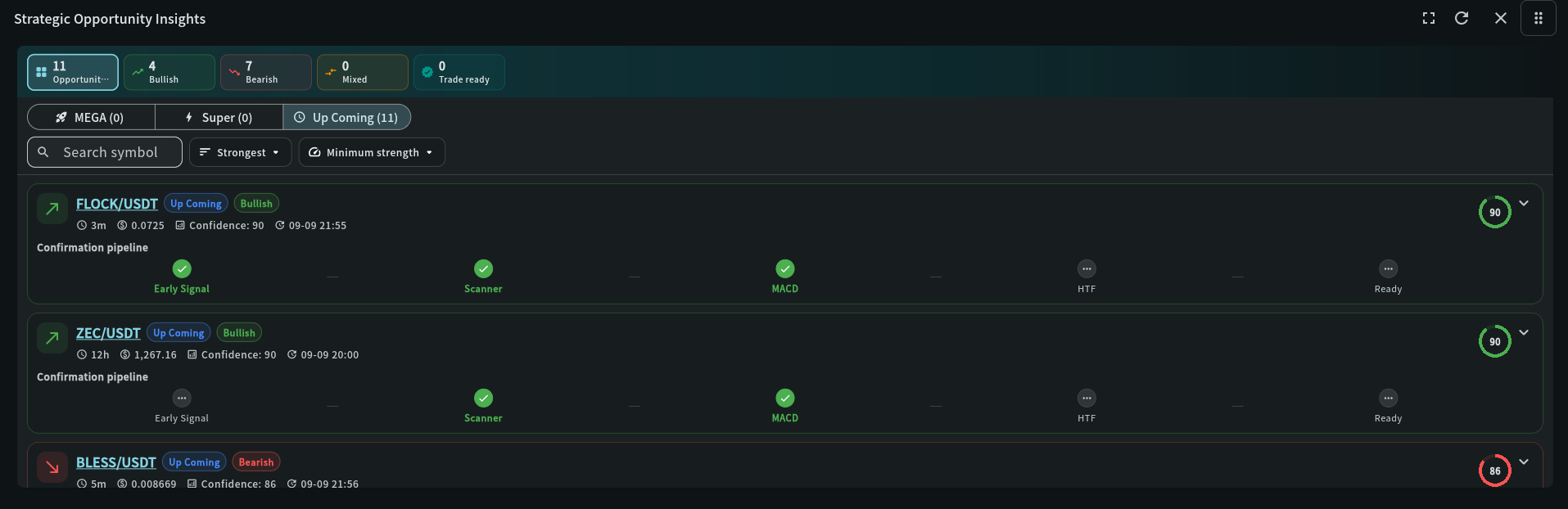
Step-by-step use
Surface MEGA, Super, and Up Coming opportunities from scanner and higher-timeframe confirmations.
Add the widget and pick the MEGA, Super or Up Coming tab.
Filter with the summary cards, set Minimum strength and sort by Strongest or Newest.
Open a symbol to continue in Scanner Signals.
Recommended attention order
Strategic Opportunity Insights lists coins where scanner and higher-timeframe confirmations line up. Use the levels to prioritise research, not as instructions.
Up Coming / Super / MEGA → Opportunities, Bullish, Bearish, Mixed, Confirmed setup → Minimum strength and Sort by → Confirmation pipeline → My Chart
Up Coming is the earliest stage: RSI has just crossed 50 (on this candle or the previous one) with MACD on the same side and the EMA not in an opposite triple trend. Super adds a scanner trend that does not oppose it and an agreeing higher timeframe (15m to 1h only). MEGA is Super on two or more timeframes. Stretched marks RSI at 80 or above (bullish) or below 30 (bearish): the move may already be extended. Signals are earlier than before, not more reliable; a higher level can still fail.
Opportunities, Bullish, Bearish, Mixed and Confirmed setup above the tabs narrow the list.
Raise Minimum strength to hide weak rows; sort by Strongest or Newest. Both are in Filter and sort.
Each card shows Early Signal, Scanner, MACD, HTF and Confirmed, plus the Confluence evidence and Scanner / HTF times; check they are fresh.
Open Scanner Signals or My Chart to check structure, liquidity, invalidation and reward-to-risk.
How to read this widget
Use these points to interpret the visible values before moving to a related record or decision.
MEGA is the strongest combined condition, Super requires the configured scanner and higher-timeframe confirmations, and Up Coming identifies partial conditions that may develop further.
The number on each tab is the current number of fresh matches inside the configured window. “No fresh strategy signals” means no current match, not an application error.
Open the symbol in Scanner Signals and compare trend, RSI, EMA, MACD, timeframe, and market conditions. Signal labels rank conditions; they do not replace position sizing or risk controls.
Field reference
Use these definitions to interpret the widget consistently across cryptocurrency and stock markets.
| Field | Meaning | Practical use |
|---|---|---|
| Signal level | MEGA, Super, or Up Coming classification from configured confirmations. | Use level to prioritize review, never as an automatic order instruction. |
| Confirmations | Number of supporting scanner or higher-timeframe conditions. | Prefer agreement across independent timeframes and inspect which confirmations are present. |
| Stretched | RSI at 80 or above on a bullish row, or below 30 on a bearish row, when the signal appeared. | Such readings tended to pull back afterwards; treat the move as possibly extended rather than as extra confirmation. |
| Freshness window | How recent a signal must be to remain visible. | Short windows reduce stale candidates; longer windows help research but increase noise. |
Check liquidity, spread, funding, and volatility before executing; crypto signals can invalidate quickly outside liquid hours.
Check earnings, news, market open/close, halts, and spread; a signal spanning a session boundary needs extra validation.
My Coin Trends provides market information and technical signals. It is not investment advice. Verify every signal against current market structure, liquidity, and your own risk limits before making a trading decision.